A few months ago, Amazon.com had Photoshop Elements as their deal of the day. I'd been talking about purchasing some kind of photo-editing software, so when my sister in law alerted me to the deal, I ordered it up without thinking twice. It arrived on my doorstep a couple days later.
Naturally, Doc was traveling for work the week it arrived so it was perfect - I could spend an evening or two learning how to use this new software without feeling bad for being on the computer all night long. Only problem? I couldn't get the darn program loaded onto my computer. Now, I readily admit that I am not very tech-savvy at all, but even I can usually install something from a cd. Especially when all you have to do is click Next, Next, Next, Finish!
After trying to install several times and even emailing print screens of every step to my own personal tech support, Mr. Washburn, I gave up and claimed defeat for the night. And then my deal-of-the-day purchase sat in its box for over a month without me attempting to install again. Fast forward to early July and there came a night when Mr. Washburn himself was going to be spending the evening at our house with Doc while I was partying with the girls. Before leaving home, I strategically placed my laptop and the Photoshop Elements package on the dining room table. You know, just in case.
After a long evening of trying to install unsuccessfully (phew! It's not just me!), Mr. Washburn took my laptop home with me so that he could further research and try to diagnose the problem. 24 hours later and the results were in, and they weren't good. Turns out there's a glitch with my computer (since it runs Window Vista) that won't let the program install. Drats. But Mr. Washburn, never one to claim defeat like I do, decided to go one step further and installed his Adobe Photoshop CS2 on my computer. Hot dog! An upgrade!
That was early July. Fast forward again to early August and I finally opened up the program to give it a go. (I know, I know, I waited a whole month. July was really busy.) With my snuggie on, phone, drink, snack, and tv remote all within reach, I was ready to spend an evening turning my ho-hum photos into images that popped! In CS2, I opened a picture that was in dyer need of some touch-ups and then....nothing. So many buttons! So many tools! So many words that I didn't know!
So, I found the little X in the top right corner and got out of there as fast as I could. Phew! So scary!
Maybe I thought as long as you had the software, you could use it to open a picture, click a button called Make The Magic Happen and then voila! Pretty pictures! Here's a little secret for those of you who don't have this program and maybe live under the same rock that I do: it doesn't really work that way.
I drummed my fingers and stared at my computer screen for a while trying to figure out what to do. I knew I needed help and there's only one person who could help me: Mr. Washburn.
In gmail, I fired off an email asking if I could register for a Mr. Washburn-led Adobe Photoshop CS2 tutorial. I hit send and crossed my fingers. Please say yes, please say yes.
He said yes!! And invited us over for dinner, too! I'm not sure how my request for help scored me a home-cooked meal too, but I wasn't about to turn it down. So this past Thursday evening, Doc and I joined Mr. Washburn, his lovely wife, and precious daughter (who seems to be smitten with my husband) for dinner. Mary Elizabeth made breakfast for dinner - even tried out a new recipe from Pinterest - and it was delicious!
After stuffing our bellies, it was time to get down to business. Doc joined Mary Elizabeth and Wesley in the living room for a special showing of Cinderella (where I think her really won Wesley over by knowing the words to Bippity Boppity Boo) so that Mr. Washburn and I could set up at the dining room table and class could begin. We started with all the tools in CS2 and made our way around the screen, learning every menu and box and what to find where. We practiced on pictures to see what each tool/action/layer could do and by the time we were through, the photos we started with were smeared, blurred, oversaturated, smudged, burned, and contrasted beyond recognition. Just a sign of a well-led, very informative class. Of course, everything made sense to me while sitting at that table. The real test would be if I could remember how to do anything back at home on the couch.
And that brings us to today. I've been parked on the couch all morning playing with photos. I've downloaded the Pioneer Woman's actions and I've read step-by-step edits from blogs that sounded like a foreign language before my class. Now, I'm ready to show you my first photoshopped picture. Feel free to critique, but be gentle. I'm still learning.
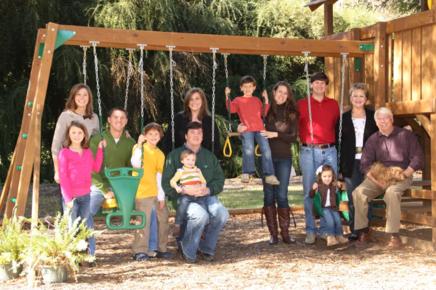
First, the before:

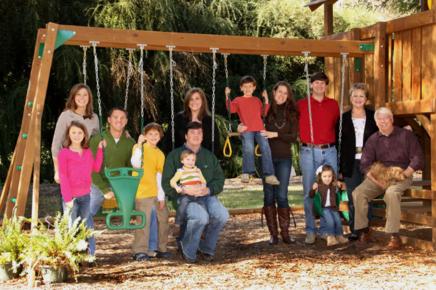
And now, after multiple hours of photoshopping and lots of undoing and starting over, the after:

What do you think? Too much?
To make myself keep practicing while the things I learned are still fresh, I'm giving myself a challenge: I will post one photoshopped picture every day this week. Let's just hope I start to get a little bit faster at this, otherwise it's going to be a long week of staring at the computer screen.